7 Ways to Use BlockBuilder (and Get the Most Out of It)
If you’ve been wondering what you can actually do with BlockBuilder beyond the basics, this post is for you. I’m going to walk through the seven ways I use it across my businesses, with screenshots of each one, so you can steal the ideas that fit yours.
Here’s the problem BlockBuilder solves for me. I have a lot of products, bundles, events, and pages that all need to say the same true thing in several places. Every time something changed, I was updating it by hand, or worse, forgetting to. That’s the kind of busywork that eats an afternoon.
BlockBuilder lets my pages pull from my Airtable data, so I update a record once and the page updates itself. If you want to see it in action before you read any further, you can watch the BlockBuilder demo here.
1. My Everything Page That Updates Itself
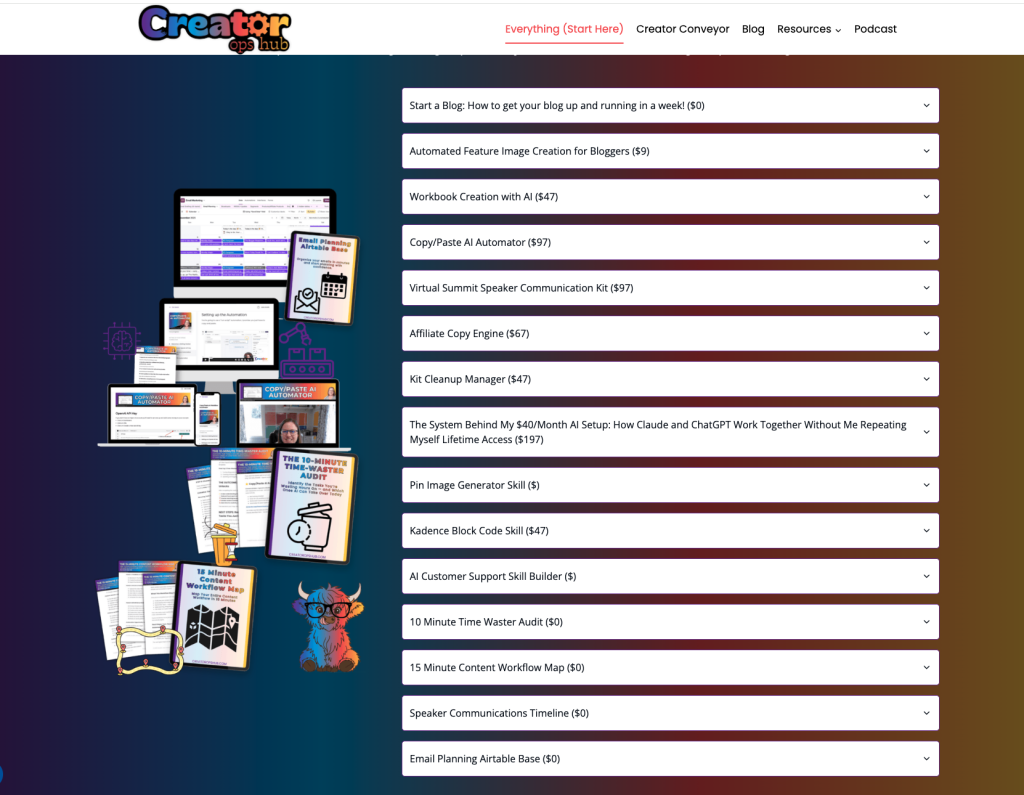
This is the one that sold me. My Everything page lists every product I sell, organized by section, and it reads straight from the Products table in my Airtable base. Each section of the page is powered by its own Airtable view.
So when I launch something new, retire something old, or change a price, I change the record in Airtable. The page follows. I don’t open WordPress, I don’t hunt for the right block, and I don’t wonder whether the page still matches reality.
And when I add a new product to my base, it shows up on my Everything page automatically.
If you sell more than a handful of things, this alone can justify the tool.
2. Bundle Pages That Show Every Contributor and Their Offer
When I put a bundle together, there’s a lot to display: who contributed, what each person is offering, and how it all fits together. Doing that by hand for a long list of contributors is tedious and easy to get wrong.
With BlockBuilder, the contributors and their offers live in Airtable, and the bundle page displays them as clean, consistent cards. If a contributor changes their offer or I add a late entry, I edit the record and the page is current. You can see it on the Week 1 page from my July bundle.
If you’re thinking about running one yourself, here’s how to grow your email list with a bundle, step by step.
3. Redemption Pages That Show People How to Get Their Access
After someone buys or signs up, the next question is always, “Okay, how do I get in?” A redemption page answers that clearly, step by step.
I use BlockBuilder to display the offers people can redeem, so the list comes from the same data as everything else. That means fewer “where do I find my stuff” emails and no copy-pasting into a dozen pages. Here’s my Redeem Creator Cash page as an example.
4. Upcoming Events Inside My Course Platform
I’m part of a lot of events, either speaking or hosting, and I want my students to see what’s coming up without me rebuilding a list every week.
BlockBuilder displays my upcoming events inside Course Connect, the course platform I built myself. The events come from my Airtable table and update automatically. Here’s what that looks like behind the scenes and on the platform side.
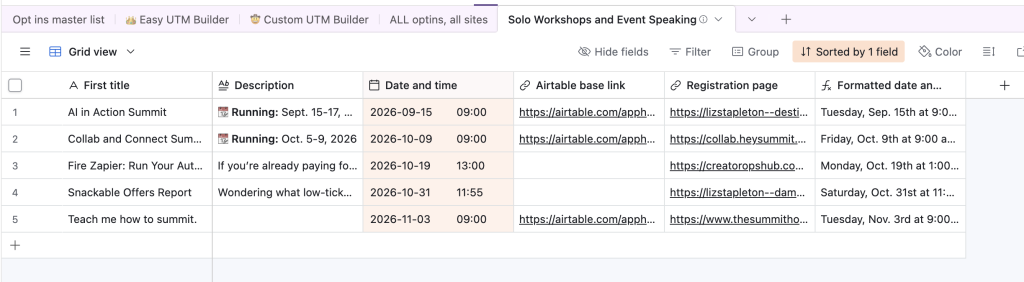
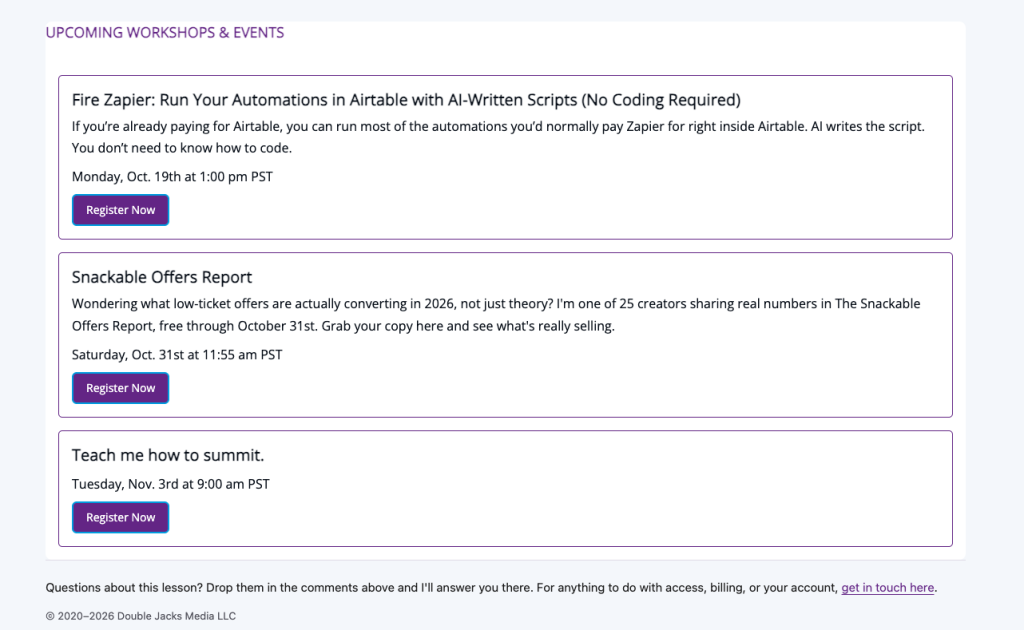
Because it updates on its own, an event that’s over simply drops off, and a new one appears the moment I add it.
5. Testimonials on My JV Workshop Info Page
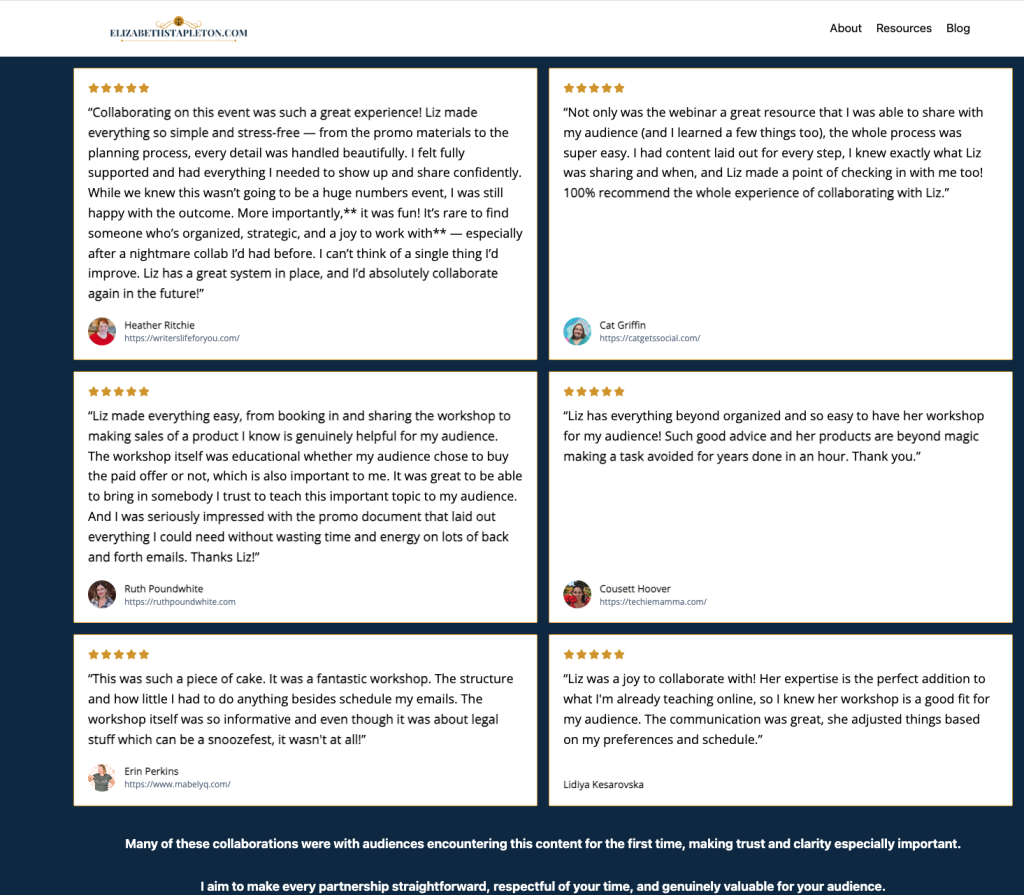
My JV workshop info page needs to show real proof from people who’ve worked with me. After a JV workshop, I always send my partner a survey on the results. Their answers feed into Airtable, and BlockBuilder displays them on the page.
I don’t redesign anything, and the page always shows the latest feedback from my joint venture partners.
6. A Question Form Inside My Kit Emails
This is one of my favorite ways to use BlockBuilder, and it’s probably the one you haven’t thought of.
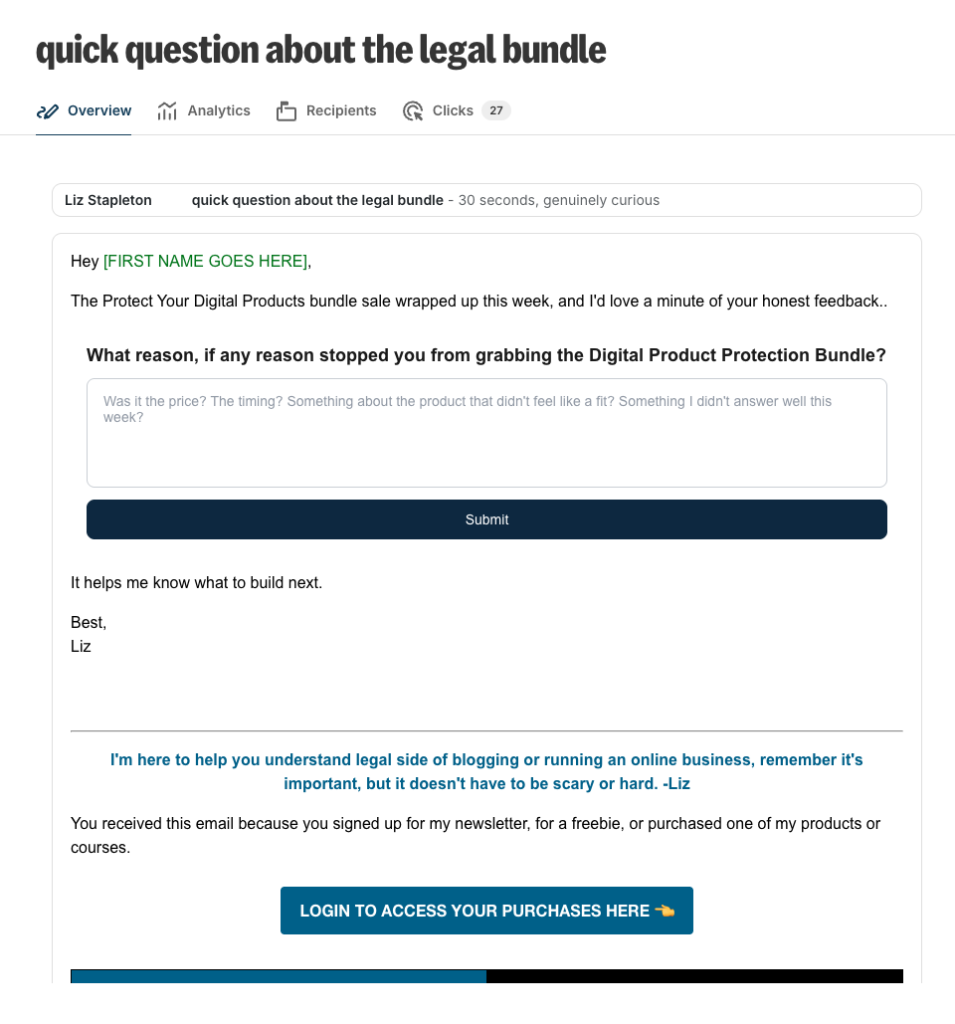
I add a question form right inside my Kit emails. It makes answering so easy that people actually do it, which is not something I can say about the surveys I used to send.
In the past, I tried sending surveys after a launch and got little to no response. Whenever I use a question form in an email, I usually get multiple responses. Fewer clicks between a reader and their answer makes a huge difference.
Here are the questions I use it for:
- After a sale or promo: why didn’t you buy? This is the most useful feedback I get, because it tells me what to fix.
- Before a workshop: what questions do you have? I collect them ahead of time so I can build the session around what people actually want to know.
- General feedback: what’s working and what isn’t?
If you’ve ever stared at a post-launch survey with three responses and wondered why you bothered, try asking one question inside the email instead.
7. The New Copy Feature for Handing Affiliates Their Swipe Copy
Steph Blake, who created BlockBuilder, just added a copy feature, and I’m excited about it.
When I email my affiliates, I want to make it ridiculously easy to promote. With the copy feature, I can put the swipe copy on a public page with a copy button, instead of hunting through a doc or a hub for it.
For a busy affiliate, the fewer steps between “I’d like to promote this” and “it’s sent,” the more likely they are to do it.
Thinking About Canceling Softr?
If you’re looking at your tool stack and wondering whether you still need Softr, it’s a fair question. I’m not here to trash any tool, because they all solve real problems for someone.
But doing what I now do with BlockBuilder was costing me $700 a year with Softr. Since I grabbed BlockBuilder at a lifetime price, those savings keep compounding every year.
If you’re rethinking your whole setup, here’s how I think about building a solopreneur tech stack.
How to Get the Most Out of BlockBuilder
If I had to give you a short list, here’s how I’d start:
- Pick one page that goes out of date and rebuild it with BlockBuilder first. A product list or events list is the easiest win.
- Keep your Airtable records clean. The page is only as good as the data behind it.
- Use one Airtable view per section of a page, so you control what shows where.
- Try a question form in your next email and see how many responses you get.
The Lifetime Deal (and Why It’s Worth It Either Way)
BlockBuilder’s lifetime deal is $699, which I know can seem like a lot, but it’s literally what I was paying Softr every year. So the fact that you can get lifetime access at that price is a steal. If you’ve been on the fence, you can grab the lifetime deal here.
I’ll be honest, though: BlockBuilder is 100% worth it even if you don’t get it on the lifetime deal. The time it saves me on pages that update themselves is worth the regular price, so please don’t feel rushed into a decision that doesn’t fit your budget.
Want to see it first? Watch the demo and decide from there.
Which of these seven ways would save you the most time? I’d love to hear which one you try first.