Vibe Coding for Solo Founders: Build Apps and Automations Without Learning to Code
I’m built a custom affiliate program management software. Not with a developer. Not with an expensive SaaS subscription. I’m building it using AI and a tool called Lovable, describing what I want in plain English and iterating until it works exactly the way I need it to.
That’s vibe coding. And if you’re a solo founder who has ever wished you could just build the tool you actually need instead of duct-taping together spreadsheet workarounds, this post is for you.
I’ll walk you through what vibe coding actually is, what kinds of things solo founders are building with it right now, and a simple six-step process to start building your first useful thing. No prior coding experience required.
What “Vibe Coding” Actually Means (In Normal-People Terms)
“Vibe coding” gets its name from the way you interact with AI tools to build software: you describe what you want in plain English, the AI generates the code, and you test and iterate until it does what you need. You’re not writing syntax. You’re writing prompts and evaluating output.
It sits on a spectrum of approaches:
- No-code: Tools like Zapier, Make, Notion, and Airtable automations. You connect blocks and set triggers. No code involved.
- AI-assisted builds: Tools like Lovable or Cursor. You describe what you want in a chat interface, the AI builds it, and you refine through conversation.
- Hybrid: AI-generated code with a few manual adjustments, connected to APIs and third-party services.
Most solo founders doing this are somewhere in the middle: using AI to generate the core of what they need, with no-code tools filling in the gaps.
What It’s Not
Vibe coding is not a magic button that produces a perfect, finished app on the first try. You’ll test it, find edge cases, and go back and forth with the tool to refine it. What it removes is the six-month “learn to code before you can build anything” barrier.
You still need clarity about what you’re building and why. The AI can write the code. Only you know your workflow.
Why This Is Happening Now
Three things converged to make vibe coding genuinely accessible in 2025 and 2026:
- AI models can now write, debug, and explain code at a level that wasn’t possible two years ago. You can describe a bug in plain English and get a working fix.
- Component libraries and templates have lowered the barrier to building clean interfaces. You don’t have to design from scratch.
- Affordable, hosted infrastructure (databases, authentication, payment processing) means you can launch a working app without managing servers.
For solo founders, this means you can prototype and validate before you hire, and automate workflows that used to require a developer or a $300/month tool subscription. According to solopreneur trend research from 2026, this kind of DIY tooling is becoming one of the defining advantages for solo operators competing against larger teams.
What Solo Founders Are Actually Building
The most useful vibe-coded projects for solopreneurs aren’t necessarily consumer apps. They’re start as internal tools and lightweight portals that solve specific, expensive operational problems.
Here are real examples:
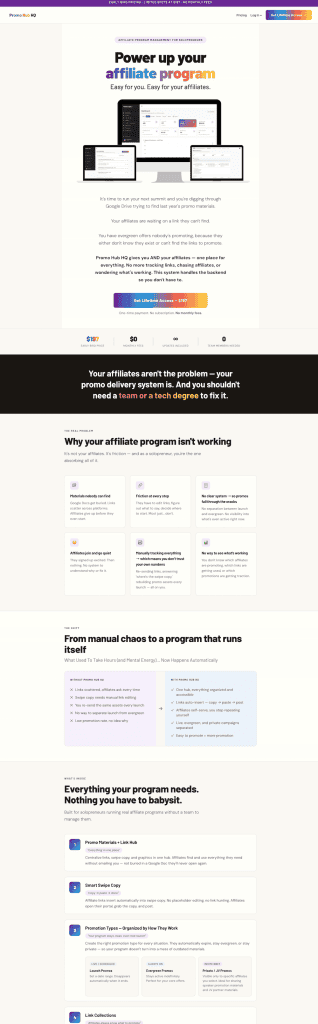
- Affiliate program management: I built Promo Hub HQ to manage my own affiliate program. It tracks links, promo materials, and partner details in one place instead of living across spreadsheets and shared folders. I solved my own problem first then made it available to others. Similarly my friend Steph built Block Builder because she was tired of paying for expensive software.
- Summit and event workflow tools: I’m currently working on an app to make hosting virtual summits easier to manage on the backend. The goal is to systematize tasks that currently live in my head.
- Content pipelines and trackers: Automations that pull data, tag records, and move pieces through a workflow without manual updates between tools.
- Client and student portals: Lightweight dashboards that give clients or students a simple, clean view of their information.
If you’ve ever said “I wish I had a tool that just did X,” that’s your build prompt.
The Starter Stack for Non-Dev Founders
You don’t need a full developer toolkit. Here’s what I’d start with:
- Lovable: The tool I use for UI-forward builds. You describe what you want in a chat interface and Lovable generates a working interface and backend. Great for dashboards, portals, and tracking tools.
- Block Builder: A solid option for building no-code dynamic webpages with more visual control.
- Airtable: Your best friend for data. A well-structured Airtable base can power most internal tools without needing a custom database.
- Claude Code or ChatGPT/Codex: Use these to plan your build, debug errors, and sharpen your prompts before taking them into a build tool.
You don’t need all of these. Start with one concrete problem and pick the tool that fits.
A Simple Six-Step Process to Build Your First Useful Thing
Step 1: Pick One Problem You Have Right Now
Don’t start with “I want to build an app.” Start with “I have this specific, recurring problem.” For me, the trigger was: I needed a way to share affiliate promo materials that stayed current based on my active offers and launches. That’s a small, concrete, solvable problem.
The more specific your starting point, the faster you’ll get something working.
Step 2: Define the Output
What should exist at the end? Be literal:
- A dashboard showing X, Y, and Z
- A page where affiliates can log in and see their current links
- A weekly summary email that pulls from Airtable
If you can’t describe the finished output clearly, pause before you build. Vague inputs produce vague outputs.
Step 3: Map the Data
What information does your tool need to function? Plan it out before touching any tool:
- Who are the users (you, your affiliates, your clients)?
- What data do they need to see?
- Where does that data currently live?
Step 4: Use the Plan Feature First
Before asking any AI tool to start building, use its planning mode. Go back and forth about the problem you’re solving and how you want it to work. Ask it to help you think through edge cases and data structure. You’ll catch design decisions early that would be painful to undo later.
This step alone saves hours of rebuilding and using up tokens unnecessarily. Done is better than perfect, but planning is better than starting over.
Step 5: Ask the Tool to Build
Once you have a plan you’re satisfied with, start building. Give the AI your full plan as context and ask it to start with the core feature, not everything at once. A working core you can test is worth more than a half-built full version.
Expect to go back and forth. Each iteration gets you closer.
Step 6: Test With One Real Scenario
Run your actual use case through the tool. Not a perfect test case. Not dummy data. Your real workflow. Capture every point where it breaks or confuses you. Those friction points are your next set of prompts.
Ship the smallest version that solves the problem. Add features after you know the core works.
The Risks (And How to Avoid the Common Faceplants)
Vibe coding is genuinely accessible, but a few areas trip up solo founders:
- Security: Don’t expose user data without proper authentication. If your tool handles any personal information, build in authentication before sharing it with anyone else.
- Accuracy: AI-generated code can have bugs. Test your core scenarios manually before treating anything as production-ready.
- Scope creep: It’s tempting to keep adding features before the core is solid. Ship the smallest version that solves the problem first.
- Vendor lock-in: Keep your data portable. If your data lives only inside a proprietary tool with no export option, you’re at the mercy of their pricing and roadmap decisions.
FAQ
Do I need to learn to code? No. You need to learn to think clearly about what you’re building and how to evaluate what comes out. That’s a different skill from coding, and most business owners already have it.
Is this “real” software? Yes. An app that works and solves a real problem is real software, regardless of how it was built.
What’s the difference between automations and apps? Automations run in the background on a trigger (a form submission, a new Airtable record, a scheduled time). Apps have a UI that someone actively interacts with. Many of the most useful solo founder tools combine both: an app that shows data, backed by automations that keep it updated.
The Takeaway
The barrier between “I wish I had a tool for this” and actually having that tool is lower right now than it has ever been. You don’t need to hire a developer to prototype. You don’t need months of coding tutorials.
You need clarity about the problem, a willingness to test and iterate, and the right tools.
Pick one workflow this week. Build the tiniest version. See what it changes.